TL;DR
ChatGPT Ads places a sponsored card under ChatGPT's answer for Free and Go users, with contextual targeting and a self-serve Ads Manager that opened across Europe on August 31, 2026. For retailers, the main lever is the product feed campaign, which depends on a clean, eligible catalog described the way shoppers state their needs.
ChatGPT Ads at a glance
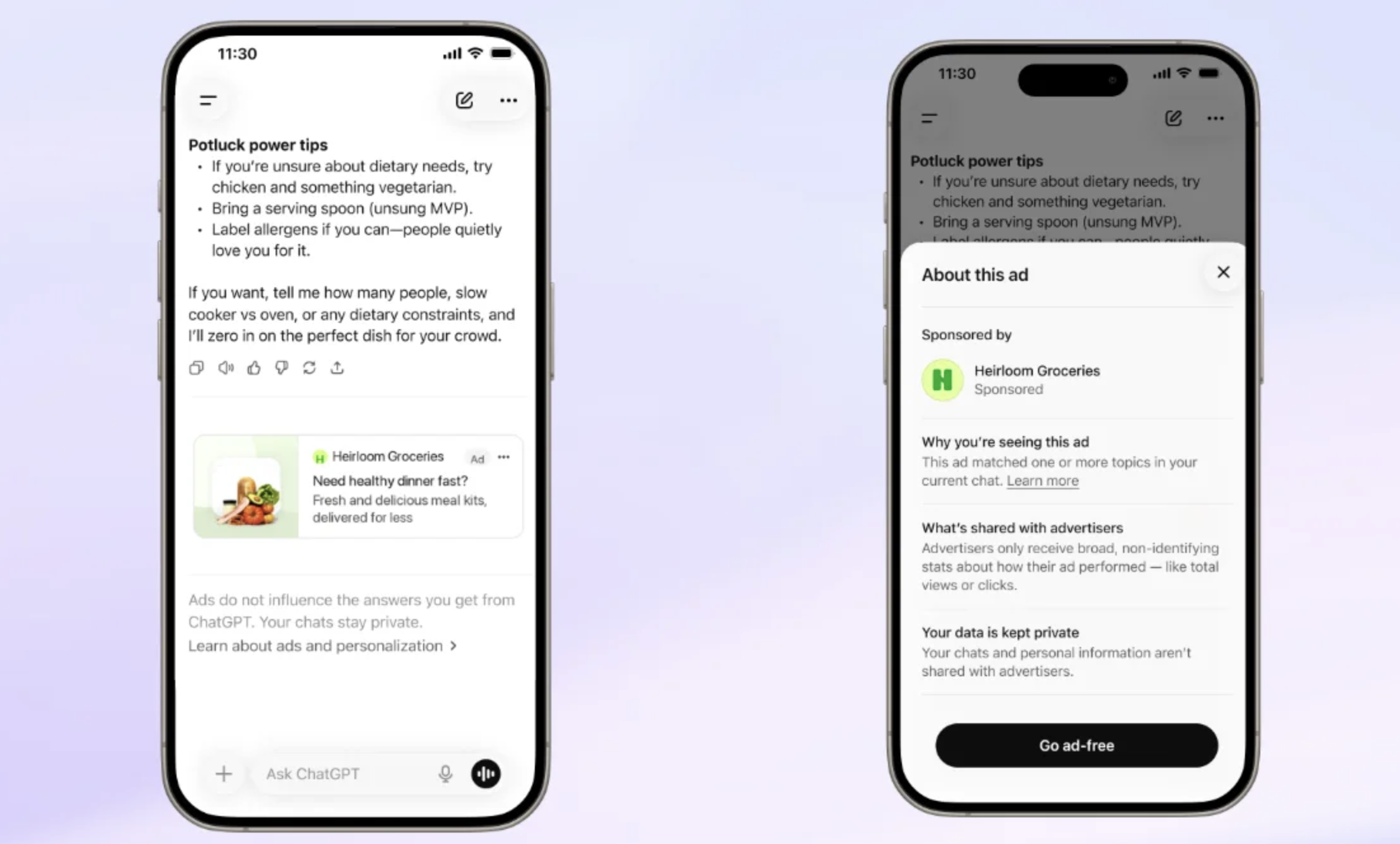
A shopper asks ChatGPT for “a lightweight waterproof jacket for a rainy weekend on the coast, under $150”. The answer compares a few options. Underneath, a card labeled “Sponsored” may show a product, its price and a link to the store. That card is ChatGPT Ads, OpenAI’s advertising program, also referred to as OpenAI Ads.
Since late August 2026, advertisers in Europe can buy that placement themselves through a self-serve Ads Manager, as US businesses already could. This guide covers where ads appear, who sees them, how targeting works, how to set up an account and a first product feed campaign, which catalog data to prepare, how to bid and measure, and how buying ads differs from being recommended in the answer itself.
Throughout, we separate what OpenAI has announced or documented, what we have observed in the market, and our own reading. The program moves fast, and several rules below are only weeks old.
Where ChatGPT ads appear
The ad shows up below the generated answer, inside the conversation, with a “Sponsored” label. OpenAI states that its ad systems are separate from the model that writes the answer, and that advertisers cannot edit, rank or influence that answer. That is the platform’s official position.
In practice, a retailer can show up in a shopping conversation in three ways:
| Placement | What the user sees | How you get there | Can you buy it? |
|---|---|---|---|
| Written answer | Your brand or product is named, compared, recommended | GEO: attributes, reviews, citable pages, structured data | No |
| Shopping carousel | Products with price and availability | Merchant data and product feeds | No |
| ChatGPT Ads | A “Sponsored” card under the answer | Budget, ad relevance, product feed | Yes |
Ads run on the web (desktop and mobile browsers) and in the iOS and Android apps. Advertisers can include or exclude each platform at campaign level.
Timeline: from a US pilot to Europe
The program went from test to self-serve in a little over six months.
- January 16, 2026: OpenAI announces it will test ads in ChatGPT in the US.
- February 9, 2026: first ads go live in the US for Free and Go users, sold to large accounts and agencies.
- Spring 2026: the self-serve Ads Manager opens in beta in the US, and product feed campaigns follow.
- August 18, 2026: OpenAI announces the European expansion.
- August 24, 2026: ads start serving in 31 European markets (the 27 EU member states plus Iceland, Liechtenstein, Norway and Switzerland). Buying runs through the OpenAI Ads Solutions team, agency groups and technology partners.
- August 31, 2026: Ads Manager opens self-serve, in beta, across those 31 markets, plus India, the Middle East and North Africa. The same day, OpenAI reports a $1 billion annualized ad revenue run rate, reached in under 200 days. A run rate is a snapshot (current revenue times twelve), not booked annual revenue.
- Early September 2026: OpenAI adds a plugin to manage Ads Manager from ChatGPT, loosens custom audience rules and expands the pixel and Conversions API.
We covered both European dates as they happened: the arrival of ads in France on August 24, then the self-serve Ads Manager and product feed campaigns in Europe on August 31.
Who sees ads in ChatGPT
According to OpenAI’s help center, ads only reach Free and Go users. Plus and Pro subscribers, as well as Business, Enterprise and Edu accounts, see none. Accounts identified as belonging to minors are excluded, and ads do not appear next to sensitive or regulated topics such as health, mental health or politics.
That rule shapes your media plan. Some of the people who research and buy through ChatGPT will never see your ad. For them, organic presence is the only lever, which we cover in the GEO section.
OpenAI says advertisers get aggregated metrics only, with no access to conversations, chat history or user memories.
Targeting: the conversation replaces the keyword
ChatGPT Ads targets the context of the current conversation. At the European launch, OpenAI held back personalization: the available signals are the conversation topic, approximate location, device and language. OpenAI has said consent-based personalization will come later, without a date.
Three settings drive targeting in Ads Manager.
Context hints. At ad group level, you describe the products, use cases and needs you want to match. OpenAI’s documentation says hints are not exact-match keywords and recommends specific phrasing: “lightweight trail running shoes for rocky terrain” beats “shoes”. An ad group accepts up to 2,000 hints. The system weighs them alongside the relevance of your title, body copy and landing page.
Geography. Product feed campaigns target and exclude at country level only. No city or postal code targeting for this campaign type.
Platforms. Web, iOS app, Android app. All three are included by default.
Custom audiences (hashed email or phone lists) exist in Ads Manager, with a 25,000 matched-user minimum for inclusion and no minimum for exclusion. The documentation does not say whether they are available in the EEA, so check your account before building a plan around them.
Ad formats
OpenAI documents two format families.
The chat card is the standard ad: a title of 3 to 50 characters, body copy of up to 100 characters, a destination URL and one image (JPEG, PNG or WebP, at least 640 × 640 pixels). A version with 4 to 6 square images exists for accounts that have access to it.
The product ad is built from your feed. You create one template per ad group, using macros such as {{product.title}}, {{product.body}}, {{product.price}} and {{brand}}. Image and URL come from the product row, so there is no destination to enter. Product feed campaigns can also use a multi-product carousel unit, whose reporting has split out impressions and clicks per product card since late August.
For a catalog with hundreds of SKUs, the product ad is the format that scales. The chat card still fits a one-off promotion or a hero product.
Ads Manager and product feed campaigns
Ads Manager, at ads.openai.com, follows a familiar hierarchy: account, campaign, ad group, ad. The campaign holds the objective, budget, schedule and targeting. The ad group holds the bid and the context hints. The ad holds the creative and destination.
A product feed campaign is created in product_feed mode and tied to one feed. Neither the mode nor the feed can change after creation. Within each ad group, a product set filters which products can serve, for example with ads_metadata.custom_label_0 to isolate a season, a margin tier or a category. Without a product set, the ad group uses the whole feed.
A few rules of the European self-serve beta matter from day one, based on the documentation and what we saw in September: approved categories, ad review and entity verification apply. Account country and currency are permanent. There is no manager account equivalent to Google Ads, so your agency gets invited into your account.
How to set up an account and a first campaign, step by step
1. Pick the legal entity. Create the account at ads.openai.com. Have the exact company name, supporting documents and a payment method consistent with the account country ready. Country and currency cannot be changed later.
2. Set up measurement. Create a Pixel ID in the conversions tab, add the pixel to the head of your pages, then configure the Conversions API for purchases. Test with debug mode before spending.
3. Create the product feed. Create a feed for your target countries, then upload the catalog. OpenAI’s documentation describes SFTP upload (a UTF-8 CSV placed in the server root) and a delta API to update price, availability and titles without resending the full file. Depending on your account, the interface may offer other import options.
4. Check ingestion. Open the upload history. A completed_with_errors status means some rows were rejected. The count of ads-eligible products tells you how many SKUs can actually serve.
5. Create the campaign. Product feed mode, an objective (impressions, clicks or conversions), a daily or lifetime budget, countries and platforms. Campaigns are created paused.
6. Structure the ad groups. One ad group per shopping intent (use case, gift, comparison, season), each with its own product set, context hints and product ad template. Each ad group takes one active template.
7. Configure tracking. Add UTM parameters in the query string template. Without them, part of your ChatGPT traffic lands in “Direct” in analytics. If your account still uses the legacy feed parameter ordering, OpenAI asks admins to migrate by November 5, 2026, through the banner in Ads Manager.
8. Launch and check review. Activate the campaign, ad groups and ads. A created ad is not necessarily approved: check its review status and serving issues before you blame low volume.
Preparing your product feed for ChatGPT Ads
OpenAI uses its own product file schema. It is close to Google Merchant Center, but field names and some formats differ. A Merchant Center export pasted as is will be partly rejected.
| OpenAI field | Status | Requirement | Merchant Center equivalent |
|---|---|---|---|
item_id | Required | Stable and unique per item or variant | id |
title | Required | 150 characters or fewer recommended, include the variant | title |
description | Required | Plain text, 5,000 characters or fewer | description |
url | Required | Absolute product page URL, variant preselected | link |
image_url | Required | Public JPEG or PNG showing the variant | image_link |
price | Required | 79.99 USD format: decimal point, uppercase currency code | price |
availability | Required | in_stock, out_of_stock, pre_order, backorder or unknown | availability |
brand | Required | Brand as shown on the product page | brand |
seller_name | Required | Selling merchant, on every row | No direct equivalent |
is_ads_eligible | Required for ads | true for products to promote, off when missing | No direct equivalent |
group_id, variant_dict | Required for variants | Parent ID distinct from item_id | item_group_id |
ads_metadata | Optional | Labels such as custom_label_0 for product sets | custom_label_0 to 4 |
gtin, sale_price, material, color, size | Optional | Valid GTIN, sale price below price | Same names |
Three details trip up catalogs most often: localized prices such as 89,00 € (rejected, use 89.00 EUR), an empty availability value (the row is rejected) and an item_id that changes between exports.
Beyond compliance, content quality decides relevance. Shoppers describe a need in plain language: material, use case, season, constraint, budget. A title like “DRESS REF 8841 SS26” gives the system nothing to match. A title and attributes that state the cut, the fabric and the occasion line up with the conversation. It is the same work as for Google Shopping, covered in our Google Shopping feed guide, with more weight on use-case attributes. We described that shift when product feeds entered the ChatGPT ecosystem.
Send the full catalog with every upload, out-of-stock items included, with stable identifiers. If catalog replacement is turned on, OpenAI deletes products missing from a full upload within a day. Refresh price and stock at least daily, through the delta API where you can. A product feed optimization tool such as Feed Enrich enriches titles and attributes from your catalog and publishes the same feed to Merchant Center, Meta and ChatGPT Ads, so there is no second file to maintain.
Budget and bidding
Ads Manager offers three campaign objectives: impressions, clicks and conversions. At ad group level, you pick a fixed bid (with a cap), maximize clicks or maximize conversions. Conversion-optimized campaigns are billed per click and need one active standard conversion event. OpenAI has announced a model that will also count view-through conversions, billed on impressions, with no date yet.
Each campaign takes either a daily or a lifetime budget, never both. You can switch a lifetime budget to daily, not the reverse. OpenAI says daily minimums depend on the account currency, and Ads Manager tells you the required amount if you go below it.
The early 2026 figures that circulated (a CPM around $60, a $200,000 commitment) belonged to the managed pilot for large accounts. Self-serve runs on an auction. We do not publish benchmark CPMs or CPCs: European auctions are two months old and prices vary by category. Our recommendation for a first test: clicks objective, daily budget, four to six weeks, then move to the conversions objective once the pixel reports reliable purchases.
Measurement: pixel, Conversions API and UTMs
The ChatGPT Ads measurement pixel sits in the head of each page and sends standard events: page and content views, add to cart, checkout started, order created, sign-ups. The Conversions API sends the same events server-side. To avoid double counting, generate one event_id and send it through both: the first event received wins.
Click-through attribution follows the window you configure and drives conversions, CPA and bidding. View-through attribution uses a fixed one-day window and shows as a separate metric. On consent, the pixel sends nothing when consent is denied, and blocked events are not replayed later, so connect it to your consent management platform.
Back this up with UTMs per ad group: dashboard clicks and analytics sessions will diverge, as on any young platform.
ChatGPT Ads vs Google Shopping vs Meta catalog ads
| Criterion | ChatGPT Ads | Google Shopping | Meta catalog ads |
|---|---|---|---|
| Intent signal | Need stated in a conversation | Typed query | Behavior and profile |
| Targeting | Context hints, country, platform | Query, feed, bids | Audiences, Advantage+ |
| Catalog source | OpenAI feed in Ads Manager | Merchant Center | Commerce Manager catalog |
| Format | Card under the answer, carousel | Product ad in results | Ad in the feed |
| Audience | Free and Go users | Google users | Facebook and Instagram users |
| Measurement | Pixel and Conversions API | Google tag and conversions | Pixel and Conversions API |
For most catalogs, Shopping and Meta still carry the volume. ChatGPT Ads adds a channel built on stated intent, fed by the same product data.
ChatGPT Ads or organic recommendation (GEO)
Paying for an ad buys neither a mention in the answer nor a spot in the shopping carousel. OpenAI sets this as a principle. The scenario to avoid: ChatGPT recommends a competitor in the answer while your sponsored card sits below it. Users notice the gap.
GEO (Generative Engine Optimization) works on the rest of the screen: getting your products named and recommended by the model. It relies on readable attributes, reviews, citable pages and a feed that matches your site. It is also the only lever with Plus, Pro and business accounts, which see no ads at all. Our ecommerce GEO guide walks through the method.
A March 2026 study documented how much product data shapes the carousels: 83% of products in ChatGPT shopping carousels matched Google Shopping organic results, as we discussed in our piece on ChatGPT shopping carousels. Since dropping Instant Checkout, OpenAI has steered ChatGPT toward product discovery, sending shoppers to the merchant’s site.
Both levers share a foundation, a catalog described the way shoppers talk, but you run them separately. Keep two columns in your dashboard: ad performance on one side (impressions, clicks, CPA, served products), citation rate and carousel presence on the other, measured on a prompt panel. The case of a fake brand ranked first by ChatGPT shows that organic recommendation is also won in the long tail, with evidence.
Best practices
- Start with your core range: in-stock families with healthy margins and rich attributes, before the long tail.
- Organize ad groups by intent (use case, comparison, gift, constraint) rather than by internal merchandising silo.
- Write context hints like real requests, drawing on the questions your customer service team hears.
- Match the landing page to the card: product page, filtered collection or use-case page.
- Localize: a user writing in Spanish should see a Spanish title.
- Measure before you spend: pixel, Conversions API and UTMs validated before the first dollar.
Mistakes to avoid
- Pasting a Merchant Center export without remapping fields and price format.
- Rushing the choice of account country or currency.
- Writing one- or two-word context hints, like a Shopping keyword list.
- Sending clicks to the homepage.
- Judging the channel on a weekend or a few hundred dollars.
- Merging ads and organic recommendation into a single “ChatGPT ROI”.
Checklist before your first dollar
- Legal entity, account country and currency confirmed
- Pixel installed, Conversions API configured, shared
event_id, debug mode tested - Consent wired to your consent management platform
- Feed created for the right countries, required fields present
- Prices in
79.99 USDformat, availability filled on every row - Stable
item_idvalues, variants grouped bygroup_id -
is_ads_eligibleset on a priority selection -
custom_labelvalues set inads_metadatafor product sets - Daily price and stock refresh
- Ad groups by intent, specific context hints, one template per group
- UTMs per ad group
- Ad review status and serving issues checked
- GEO prompt panel tracked in parallel
To send your catalog to Ads Manager from the feed you already publish, see the Dataïads ChatGPT Ads connector.
FAQ
How do I advertise on ChatGPT?
Create an account at ads.openai.com, install the pixel, upload a product feed or prepare a chat card, then build a campaign with an objective, a budget, country targeting and context hints. Self-serve is open in the US and, since August 31, 2026, across the EEA and Switzerland, India, the Middle East and North Africa.
Who sees ads in ChatGPT?
Adult users on the Free and Go plans. According to OpenAI, Plus and Pro subscribers and Business, Enterprise and Edu accounts see no ads.
What is the ChatGPT Ads Manager?
The self-serve platform at ads.openai.com where advertisers create campaigns, upload product feeds, set bids and budgets, install the pixel and read reporting, without going through OpenAI’s sales team.
How much does it cost to advertise on ChatGPT?
Self-serve runs on an auction, with no account minimum like the early pilot’s. Daily budget minimums depend on the account currency, and Ads Manager shows the required amount when you create a campaign. Plan a four- to six-week test to get a usable signal.
Can I use my Google Merchant Center feed for ChatGPT Ads?
The data is the same, but OpenAI’s schema uses its own field names (item_id, url, image_url, seller_name, is_ads_eligible) and a strict price format. You need a mapping. A product feed optimization tool can publish both versions from one source.
Do ChatGPT Ads improve my visibility in ChatGPT answers?
No, according to OpenAI: ad systems are separate from the model, and the ad appears below the answer. Mentions in the text and carousel placement depend on GEO and product data quality.
How do I track conversions from ChatGPT Ads?
With the measurement pixel on your site and the Conversions API server-side, deduplicated with a shared event_id, plus dedicated UTMs. Ads Manager separates click-through and view-through conversions (one-day window).
Can I target audiences on ChatGPT Ads?
Targeting is contextual: context hints describing the needs you serve, plus country and platform. In Europe, personalization was not active at launch, and custom audience availability should be checked in your account.